Control what websites see
about your location

GeoWarp lets you define location profiles and assign them to specific websites. Each site sees the geolocation, language, timezone, and locale you choose — not your real ones.

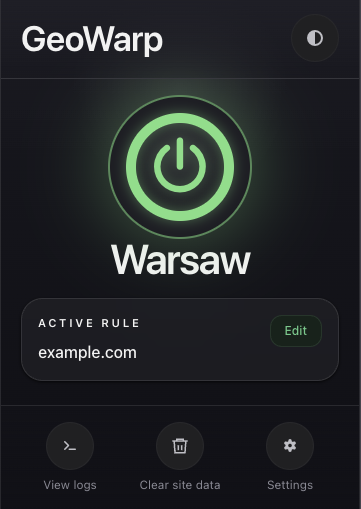
GeoWarp popup showing active location spoofing for Warsaw

The problem

Websites know more about you than you think

Every site you visit can read your browser's location, language, timezone, and locale settings. These signals reveal where you are, what language you speak, and what region you're in — often without you even noticing.

The solution

GeoWarp gives you the control

Create location profiles with custom coordinates, language, and timezone. Assign them to any website. GeoWarp replaces the browser signals that site sees — consistently, across every layer, so nothing looks out of place.

Features

Everything you need to manage
your digital location

Precise per-domain control over what each website sees.

Location Profiles

Save locations with coordinates, language, timezone, and accuracy settings. Create as many as you need — one for each country, city, or scenario.

Realistic Geolocation

Spoofed GPS with natural coordinate noise, accuracy simulation, and realistic callback timing. Positions look authentic, not synthetic.

Language & Locale

Override the language, date formats, and number formatting the site sees. Everything stays consistent — from JavaScript APIs to HTTP headers.

Timezone Spoofing

JavaScript Date and Intl APIs return the timezone of your chosen location. Pages see local time matching the profile, not your real clock.

Domain Rules

Assign different profiles to different websites. Use exact domain matches or wildcard patterns like *.example.com for flexible routing.

Site Cleanup

Clear cookies, localStorage, IndexedDB, cache, and service workers for any domain — all with one click. Start fresh whenever you need.

Firefox Containers Panic Mode Worker & Iframe Propagation Fingerprint Hardening Built-in Sandbox Debug Logging

How it works

Three steps to a new identity

No setup complexity. No cloud accounts. Everything runs locally.

1

Create a profile

Pick a city or set coordinates manually. GeoWarp fills in the matching language, timezone, and locale automatically.

2

Assign to domains

Create rules that connect websites to your profiles. Use exact domains or wildcard patterns for groups of sites.

3

Browse with confidence

Visit the site naturally. GeoWarp applies your profile before the page loads — seamlessly and consistently.

Interface

Designed for precision,
built for clarity

GeoWarp settings page showing location profiles for cities around the world
Settings — Manage your location profiles
GeoWarp location editor with interactive map and coordinate inputs
Location Editor — Fine-tune coordinates and map preview
GeoWarp popup showing active spoofing status
Popup — Quick status and controls
GeoWarp sandbox testing interface with live API comparison
Sandbox — Test your profiles before deploying

Transparency

What GeoWarp is not

We believe in honesty. GeoWarp does specific things well — and we're clear about what it doesn't do.

Not a VPN or proxy. GeoWarp doesn't change your IP address or route traffic through external servers.
Not full anonymization. It doesn't guarantee invisibility from all tracking techniques.
Not a cloud service. No accounts, no backend, no data leaves your browser.
Not IP geolocation spoofing. If a site checks your location by IP, GeoWarp won't change what they see.

Privacy & Security

Your data stays
in your browser

GeoWarp is built on a simple principle: your data is yours.

100% Local

All profiles, rules, and settings stay in your browser's local storage. Nothing is sent to any external server.

No Remote Code

GeoWarp never loads external JavaScript or WebAssembly. All code ships with the extension.

Optional Maps Only

OpenStreetMap is used only if you explicitly enable it. Map features require your consent before any request is made.

Read Full Privacy Policy